

Add a Shipping Profile
You'll need to enable a shipping method so your customer can check out and purchase your item (otherwise, the items will show as sold out or out-of-stock on Shopify).
Shipping can be quite complicated, so let us show you a quick and simple method. The instructions below will show you how to set up a flat rate shipping of $7 to USA destinations with economy shipping.
1- In your Shopify dashboard's left sidebar, click the "Settings" link:

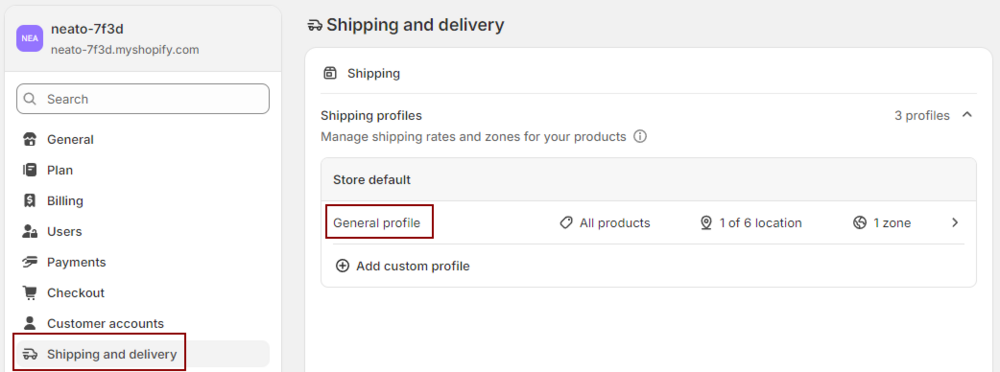
2- Click "Shipping and delivery", then click "General profile":
3- In the General Profile, click the "Add rates" button next to the NeatoPOD Fulfillment app.
Please note that your NeatoPOD app will have a string of unique id text and numbers. If you see multiple instance of NeatoPOD apps, it's a good idea to repeat the instructions below for all of them.

4- Add the shipping rate for NeatoPOD Fulfillment app
Zone name: NeatoPOD USA
Click the checkbox next to the United States icon. This will enable shipping to all USA destinations, including US territories and APO addresses. If you want to ship only to certain states, you can select/deselect the destinations by clicking the down arrow to the right side.
Rate type: Use flat rate
Note that if you subscribe to Shopify Plus, you have carrier-calculated shipping enabled. Otherwise, if you're on the basic Shopify plan, the flat rate option is the only option available.
Shipping rate: Economy (5 to 8 business days)
Price: $7
Then click "Done"

After you click "Done", the General Profile will list the shipping zone for the NeatoPOD Fulfillment app as such:

6- Click "Save"
Don't forget to scroll down and click the "Save" button (or click the "Save" button on the top bar)

Note: if you want to add international shipping, you have further setup procedures to do on Shopify. See: Selling to International Markets.
If this is your first foray into Shopify or e-commerce, we highly recommend you sell only to USA first and expand to international destinations later, after you got the hang of selling domestically.
Now you're ready to set up your first item!