

Link an Existing Shopify Item to NeatoPOD
Note: NeatoPOD Shopify app is in beta - Please help us improve the app by emailing us bug reports.
If you already have a POD item listed and actively selling on Shopify, you'd need to link that to an existing NeatoPOD item.
Note: If there is no item on Shopify yet, it's easier to create the item on NeatoPOD and then copy that item to Shopify. Here's how to Add a NeatoPOD Item to Shopify.
Here are the step-by-step instructions on how to link the item:

1- Edit the item on NeatoPOD
In your NeatoPOD dashboard, click "My Items" on the sidebar. Find the item, and click "Mockups"

2- Find the NeatoPOD SKU for the color and size variant
In the Item Mockup page, scroll down to the Variant section. Click the triangle to reveal the SKU for the color/size variant. For example, the small white variant of the item above is 15930-S-wht. Clicking this will copy the info to the clipboard.

3- Edit item on Shopify
In your Shopify dashboard, click "Products" on the sidebar, and then click the item you'd like to link. In this example, let's link the "Five Point Star T-Shirt".
Note: The item title on Shopify does not need to match with the item name on NeatoPOD. For example, you can have a long and descriptive item title on Shopify (for SEO purposes) and keep the item name on NeatoPOD short.

4- Edit the Variant on Shopify
Click the down arrow of the Small size of that item to reveal the color variant. Click on that color variant. In this example, click on the "White" text.

5- Add the SKU info
Select "NeatoPOD Fulfillment" for the Inventory dropdown field. The random string after the app name is a unique identifier that you can ignore.
If you see multiple instances of NeatoPOD Fulfillment app, use the one with the highest number. That is the latest install of the app.
Add the SKU info - in this case, for Small White, enter the info 15930-S-wht (You can paste this info if you've copied the value to the clipboard in Step #1).
Then scroll down and click "Save"
6- Repeat for all the other sizes and color variants
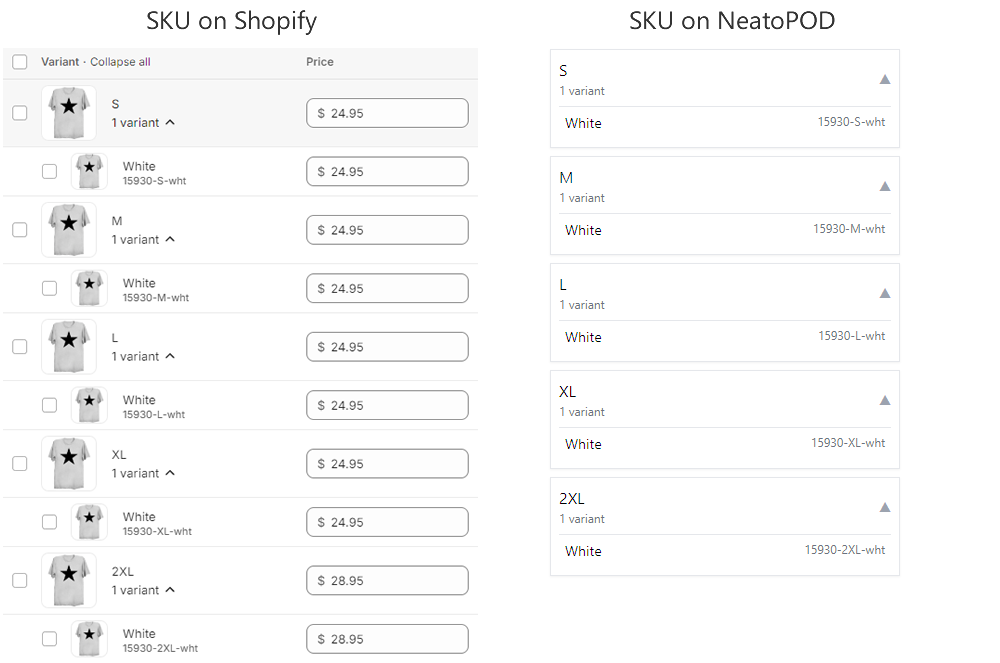
Note: Please make sure that the SKUs on all of the variants of the item on Shopify match those at NeatoPOD.

7- Add NeatoPOD as Vendor
In your Shopify item edit page, enter "NeatoPOD" as the vendor for the item.
Save the item and you're done! The Shopify item is now linked to its counterpart on the NeatoPOD.