

Import a Shopify Order
In your Shopify dashboard, click the order:

Note that the Location should be NeatoPOD Fulfillment.
IMPORTANT: Please make sure that you have enough credit in your NeatoPOD account balance to cover the order. If you do not have enough credit, the fulfillment request will fail (Shopify sometimes don't show you the reason why).
Click the "Request fulfillment" button.
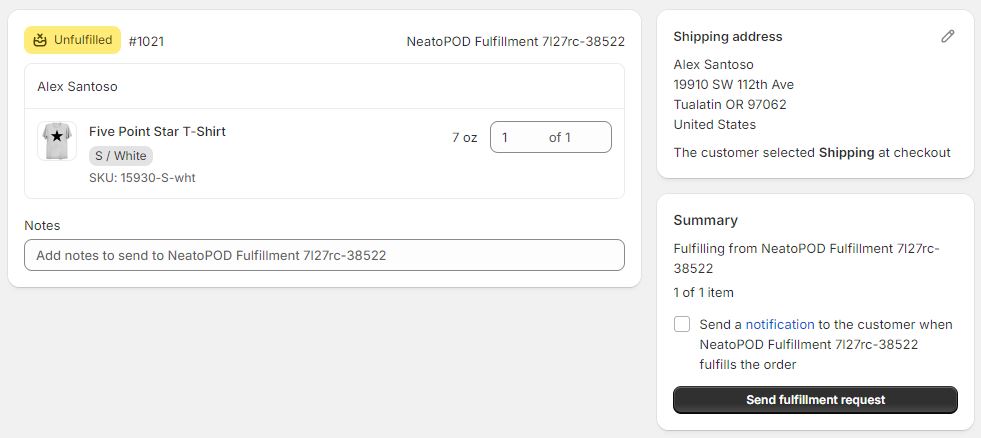
Confirm the request by clicking the "Send fulfillment request" button.

The fulfillment order is now marked as accepted.
Important: You should log into your NeatoPOD dashboard to confirm that the order has been created. If you don't see a new order, then the order import has failed. Please make sure that you have enough credit and try again.
(Optional) How to upgrade shipping method
As a default, the imported order will be shipped with USPS Ground Advantage with the standard printing queue. If you'd like to upgrade the shipping to a faster method, you'd need to edit that order in your NeatoPOD dashboard.
Here's how:
1- Order History
In your NeatoPOD dashboard, click "Order History" and find the order you've just imported. On the right-hand side, click "Edit"
2- Calculate Shipping
In the order edit page, you can edit the customer's name and address, add a message to be printed on the packing slip, as well as edit the shipping method.
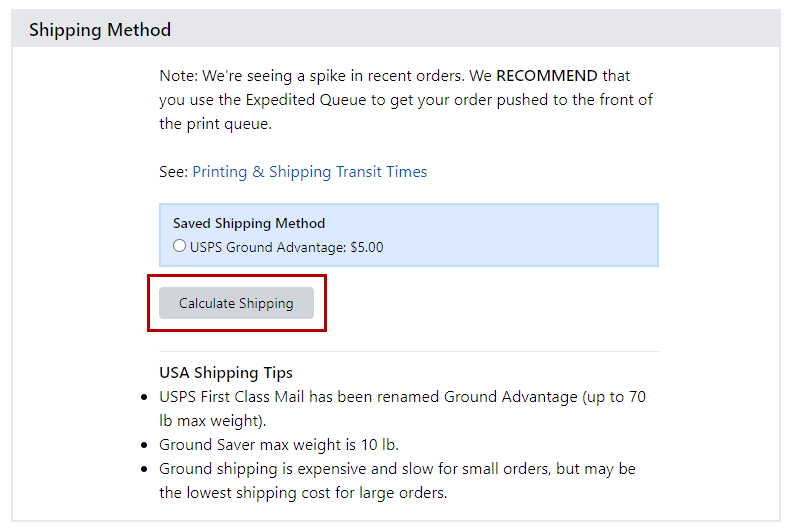
Click "Calculate Shipping" to see the available shipping upgrades for this order.

Select the new shipping method you'd like and then scroll down and click the "Update Order" button.